
FireMapSim-v2
Wildfire simulation workspace
FireMapSim-v2
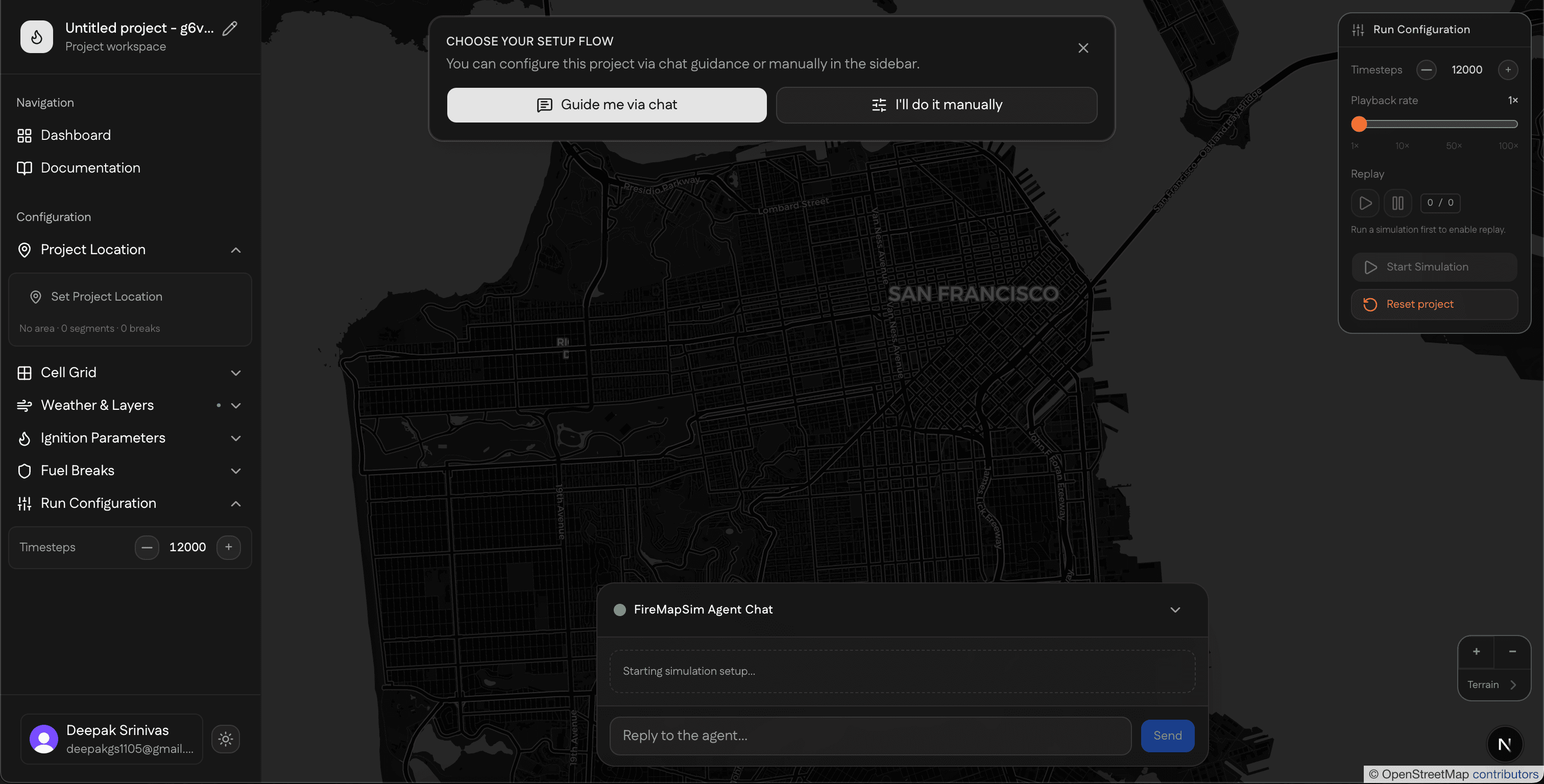
A minimal interface for configuring wildfire scenarios, reviewing spatial context, and moving from login to dashboard to simulation workflow without unnecessary product framing.
Map-first scenario setup
Agent-assisted intake
Replayable project runs
Key features
A concise interface for wildfire scenario preparation
The first content section expands the primary capabilities one by one, with the emphasis on task flow rather than feature marketing.
Map-first scenario setup
Define project boundaries, ignitions, and fuel breaks inside a spatial workspace designed around wildfire planning tasks.
Agent-assisted intake
Use guided prompts and structured actions to populate weather, terrain, and simulation parameters with less manual overhead.
03Replayable project runs
Persist configurations and rerun scenarios so different assumptions can be compared in a consistent workflow.
Tech stack
Implemented with the stack already present in the project
This section stays factual and brief, naming the core technologies that support authentication, mapping, agents, and persistence.
Full Stack
Languages, runtime, UI framework, docs, auth, maps, persistence, and agent wiring used by the app.

TypeScript

Bun

React

Next.js

Nextra

Tailwind CSS

Clerk

Leaflet

PostgreSQL

Python

Mastra

MCP

FastMCP
AI and Dev Tools
Model providers, coding assistants, and the editor environment used for development.

Claude

Claude Code

Qwen

Cursor
Cloud and Hosting
Inference routing and deployment targets for the production app.

OpenRouter

Vercel
Agentic features
AI assistance is presented as workflow support
This section reflects the current system: structured assistance for configuration, synchronization with the workspace, and orchestration of simulation actions.
Structured workflow guidance
The agent helps gather inputs in a form that stays synchronized with the workspace rather than acting like a generic chat bot.
Execution-oriented orchestration
Agent outputs are shaped to trigger simulation setup, delegate runs, and keep scenario state aligned with backend execution.
Context retention for iteration
Conversation state and project context support repeated refinement as scenarios evolve across multiple runs.
UI features
The interface is designed around map interaction and review
This section highlights the user-facing qualities of the workspace itself: layered context, low-friction controls, and a presentation style suited to research and operations.
Minimal workspace presentation
The interface emphasizes task clarity, readable state, and purposeful controls over product-style marketing treatment.
Layered map workspace
Terrain, weather, and fire overlays are organized into a workspace model suited to geospatial analysis and simulation review.
Responsive working surfaces
Core navigation and summary panels are designed to remain usable across desktop review sessions and smaller laptop layouts.